
Make a Flipbook from PDF with this awesome Flipbook software
Updated on: 08.06.2026
If you've ever wanted to turn a static PDF into an engaging, page-turning digital publication — without writing a single line of code — you're in the right place. This guide walks you through exactly how to make a flipbook from PDF, what benefits it brings, and which free tool makes the whole process surprisingly easy.
What Is a Flipbook — and Why Does It Matter?
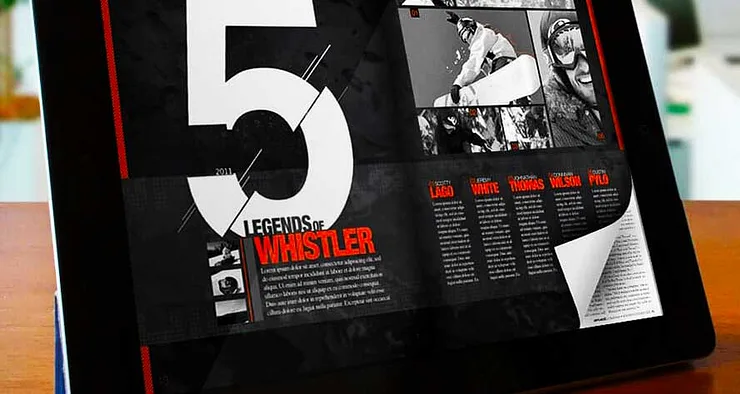
A flipbook is a digital publication that mimics the look and feel of a printed magazine or journal. Pages can be flipped and turned just like in a real book, preserving that familiar reading experience while adding interactive elements like navigation, links, and multimedia. For content creators, bloggers, and small business owners, this format is a powerful way to make documents stand out in a world where attention is increasingly hard to earn.
Static PDFs are functional, but they don't engage readers the way a flippable, interactive publication does. An online flipbook transforms a standard document into an experience — one that readers are far more likely to explore, share, and return to. If you're looking for a Why should you use a Flipbook Maker?, the answer often comes down to engagement, reach, and ease of distribution.
Why Convert PDF to Flipbook?
When you convert a PDF into an interactive digital flipbook, you unlock several practical advantages that a plain PDF simply can't offer:
Better Google visibility: A well-optimised flipbook is indexable by search engines, meaning your content can be discovered on Google, Bing, and beyond — not just downloaded and forgotten.
Easy embedding on your website: After uploading your file, you get an embed code that lets you integrate the flipbook directly into any webpage, improving the user experience for your site visitors.
Social media sharing: Flipbooks can be shared across platforms like Facebook and X (Twitter), giving your content the potential to reach a much wider audience organically.
Accessible on any device: HTML5-based flipbooks adapt to any screen size — desktop, tablet, or mobile — so your readers always get a clean, responsive experience.
No printing, no postage: Digital flipbooks eliminate the cost and logistics of printing and distributing physical copies, making them ideal for catalogs, brochures, and newsletters.
Getting Started: Create Your Free Account
YUMPU Publishing is one of the most established tools available for converting PDFs into interactive flipbooks. As a free flipbook publishing platform, it lets you create an account in under a minute and start uploading your documents right away — no design skills or technical knowledge needed.
Ready to get started? Create your free account now and turn your first PDF into a professional digital flipbook within minutes.
Step-by-Step: How to Make a Flipbook from PDF
The process is straightforward. Here's how to go from a PDF file to a fully functional online flipbook:
Create a free account on YUMPU Publishing. Registration takes less than a minute.
Upload your PDF. Simply select the file you want to convert — the platform handles the rest.
Wait 2–3 minutes while your PDF is converted into an HTML5 flipbook. While you wait, you can edit metadata like the publication title and description. Optimising these details improves your flipbook's ranking in search engines — which directly affects how many people discover your content.
Embed the flipbook on your website or blog using the automatically generated embed code. This is especially useful for product catalogs, digital magazines, or course materials.
Share it on social media. Use the share button to distribute your flipbook on Facebook, X, LinkedIn, and more. You can also include it in your email footer to make every email you send a content distribution opportunity.
Protect sensitive publications with a password via the Publish Settings — available on the adFREE plan.
Add multimedia elements such as videos, audio, links, and slideshows using the Hotspot Editor (adFREE plan), turning your flipbook into a fully interactive digital magazine creator.
HTML5 Flipbooks: Compatibility and Reach
One of the key technical advantages of YUMPU's conversion process is that your PDF becomes an HTML5 publication. This means it's compatible with all modern browsers and devices without requiring plugins. Whether your readers are on a laptop at home or scrolling on a smartphone on their commute, your flipbook renders correctly every time.
This PDF to HTML5 conversion also means that search engines can actually read and index your content — something that's much harder with a standard PDF. If you're publishing content you want people to find, that's a significant advantage over simply hosting a file download. You can also find practical guidance on Convert PDF to Flipbook Free to explore additional options and comparisons.
Who Benefits Most from Flipbook Publishing?
The flipbook format works particularly well for:
Bloggers and content creators who want to repurpose written content into a more shareable, visual format
Small businesses looking to distribute product catalogs, brochures, or price lists without printing costs
Educators who want to share course materials, study guides, or presentations in an engaging digital format
Marketers who need a professional-looking digital magazine creator for campaigns, reports, or client presentations
In all of these cases, the interactive flipbook format does something a standard PDF can't: it invites the reader to stay, explore, and engage.
FAQ: Making a Flipbook from PDF
What is a flipbook?
A flipbook is a digital publication that replicates the page-turning experience of a printed book or magazine. It's typically created from a PDF and features interactive elements like navigation buttons, links, and multimedia content.
Is it free to make a flipbook from PDF?
Yes, platforms like YUMPU Publishing offer a free tier that lets you convert and publish flipbooks online at no cost. Advanced features like password protection and multimedia hotspots are available on paid plans.
Do I need coding knowledge to create a flipbook?
No coding is required. Most online flipbook tools, including YUMPU, handle the entire conversion process automatically — you just upload your PDF and the platform does the rest.
Can my flipbook be found on Google?
Yes. HTML5 flipbooks hosted on publishing platforms are indexable by search engines. Editing the title and description metadata during upload can help improve your content's visibility in search results.
Can I embed a flipbook on my website?
Absolutely. Once your PDF is converted, you receive an embed code that allows you to integrate the flipbook directly into any webpage, blog, or landing page.
Can I share my flipbook on social media?
Yes. Most flipbook platforms include social sharing features, allowing you to distribute your publication across Facebook, X, LinkedIn, and other channels with a single click.
What file types can I convert into a flipbook?
PDF is the most commonly supported format. You simply upload your PDF and the platform converts it into an interactive HTML5 flipbook automatically.
How long does the conversion process take?
Typically around 2–3 minutes, depending on the size of your file. During this time you can already start editing the publication's metadata.
Can I protect my flipbook with a password?
Yes, password protection is available on YUMPU's adFREE plan. This is useful for sensitive documents, internal reports, or exclusive content for paid subscribers.
Can I add videos or audio to my flipbook?
Yes, interactive multimedia elements — including videos, audio, links, and slideshows — can be added via the Hotspot Editor on YUMPU's adFREE plan, making your flipbook a fully interactive digital experience.
 Robert Taylor
Visual artist, sometimes triathlete, holder of serious parking karma & drip coffee skills. Web developer, creative, music maker, cook. Yep, that's me!