
How to Create an HTML5 Flipbook for Free: The Professional Guide
![HTML5 Flipbook Easily + 100% Free! – [Solved] How to Create It?](https://nubuntu.org/assets/images/f/163378/760x308/47c0a032ea/html5-flipbook.webp)
Updated on: 13.08.2026
Creating a professional HTML5 flipbook for free used to sound too good to be true — but with the right tool, you can convert any PDF into an interactive, mobile-ready digital publication in just a few minutes, no coding skills required. This guide walks you through every step: from preparing your PDF to publishing, sharing, and embedding your flipbook across websites and social media.
Why an HTML5 Flipbook Changes the Game
If you've been sending out static PDFs by email or printing stacks of brochures for every meeting, you already know the pain: large file sizes, poor mobile readability, and zero insight into who actually read your content. An HTML5 flipbook solves all of that at once. Unlike a standard PDF, it loads instantly in any browser, looks stunning on smartphones and 4K monitors alike, and — crucially — gets indexed by Google and AI search engines, putting your content in front of the right audience organically.
The shift from print-first to digital-first thinking also has a very practical upside: no more printing costs, no more courier fees, and no more outdated versions floating around. You update your publication once, and every reader sees the latest version immediately. For anyone managing newsletters, training materials, community reports, or product catalogs, this alone is worth the switch.

Finding the Right HTML5 Flipbook Tool
Testing several platforms quickly reveals a common frustration: most tools either require prior HTML knowledge, charge steep subscription fees for basic features, or produce sluggish, ad-heavy results. After going through a number of options, YUMPU Publishing stood out as the most complete free solution for converting PDFs into polished interactive HTML5 flipbooks — without needing to touch a single line of code.
The platform supports all types of publications: digital magazines, product catalogs, training manuals, newsletters, event brochures, and more. What makes it particularly practical is the combination of a clean upload workflow, built-in SEO optimization, and multimedia support — all accessible on the free plan. For those who want to explore what a truly ad-free, analytics-enhanced experience looks like, YUMPU adFREE – Create Ad-Free Digital Magazines takes things a significant step further.
Step-by-Step Tutorial: Create Your HTML5 Flipbook for Free
This tutorial takes around 20 minutes end-to-end — but you'll have a working basic flipbook within the first 2–3 minutes. Here's everything you need:
Step 1 – Prepare Your PDF
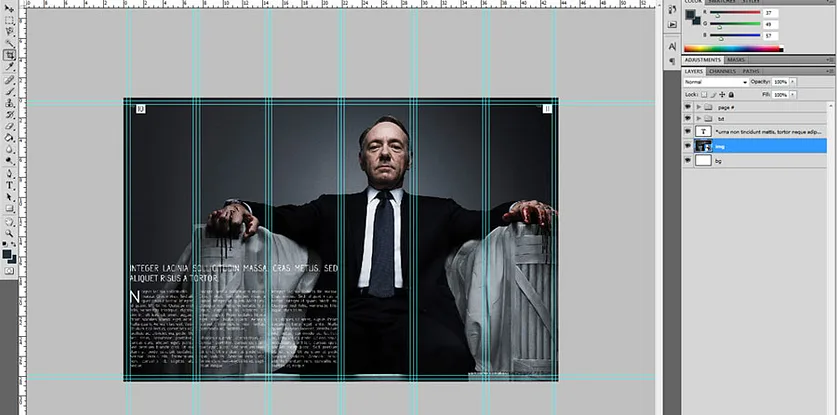
Every HTML5 flipbook starts with a PDF. If you already have one, skip ahead. If not, you can create one easily using Microsoft Word or PowerPoint: design your document, then go to File → Export → PDF. For more advanced layouts — think magazine-style designs with custom typography and imagery — tools like Adobe InDesign or Photoshop give you much more control. A good starting point for templates is GraphicRiver, where you'll find professional magazine and catalog layouts for Photoshop and InDesign at reasonable prices.
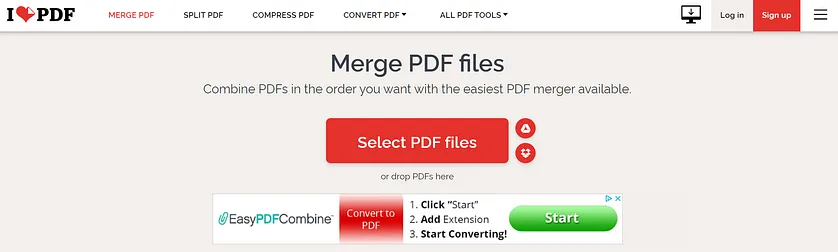
If your publication spans multiple pages saved as separate PDFs, you'll need to merge them into a single file before uploading. A free online tool like IlovePDF handles this in seconds — just drag in your files, merge, and download.
Step 2 – Create Your Free YUMPU Account
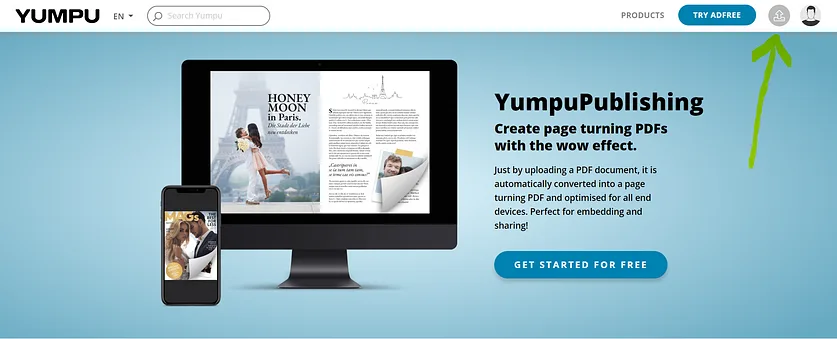
Head over to YUMPU Publishing and register with your email address. Confirm your account via the link in the confirmation email — that's all it takes. You now have a free account ready to use. Once logged in, you'll see a gray upload icon next to your profile icon in the top navigation. Click it to get started.
Ready to try it yourself? Sign up free and create your first flipbook — the whole process takes less than five minutes.
Step 3 – Upload and Convert Your PDF
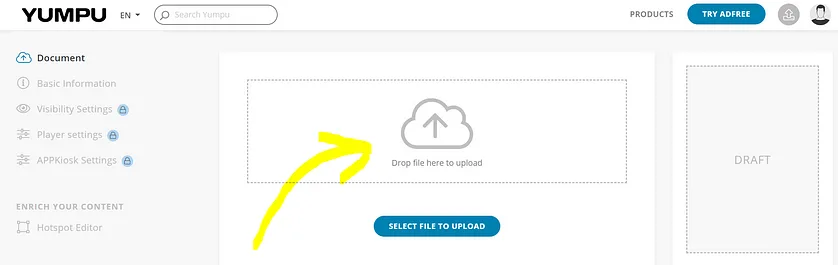
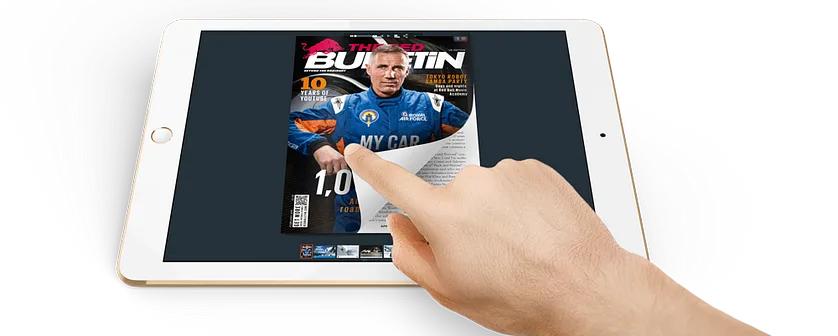
Drag your PDF into the upload area labeled "Drop a file here to upload" and wait for the conversion to complete. For larger files, this may take a few minutes. Once processed, your PDF is automatically converted into a fully interactive HTML5 flipbook with a realistic page-turn effect, ready to view and share.
Step 4 – Edit Flipbook Settings
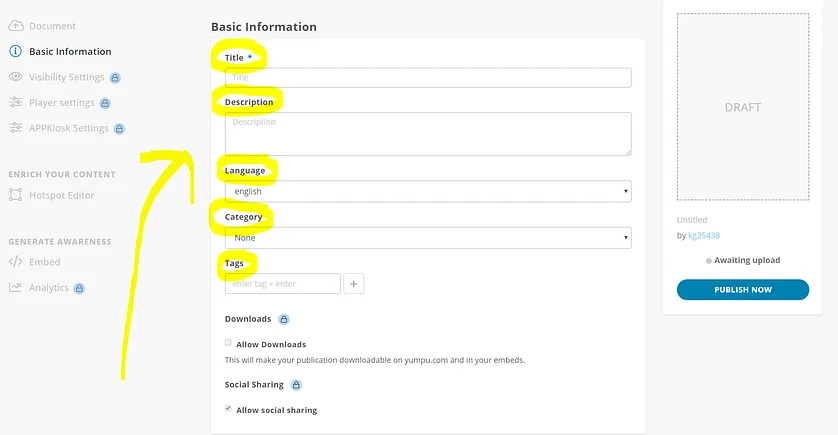
After uploading, scroll down to the basic information section. Here you'll add a title, a detailed description, and relevant tags. This step matters more than it might seem: a well-written description and at least five tags significantly improve how your flipbook ranks in Google and other search engines. The platform will also auto-suggest tags based on your content — review them and remove anything that doesn't fit.
Check that the detected language is correct, as this determines which regional version of YUMPU your publication appears in — and the platform has millions of active readers across language versions.
Step 5 – Add Multimedia with the Hotspot Editor
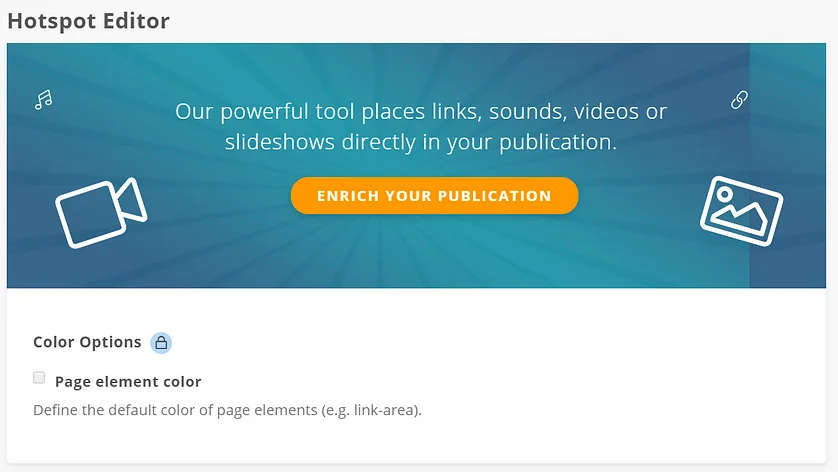
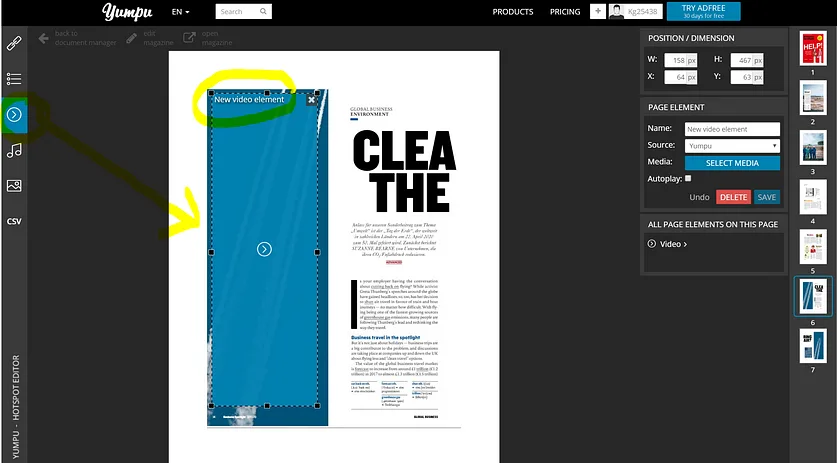
One of the most compelling features of an HTML5 flipbook is the ability to embed multimedia directly into your pages. The Hotspot Editor — found just below the APPKiosk settings — lets you add videos, audio files, and hyperlinks to any page via drag and drop. Select a page on the right, choose your media type on the left (video, audio, or link), click to place it, resize as needed, and enter the source details (e.g., a YouTube ID for video). Hit save, and the hotspot is live inside your interactive PDF.
Step 6 – Share and Embed Your Flipbook
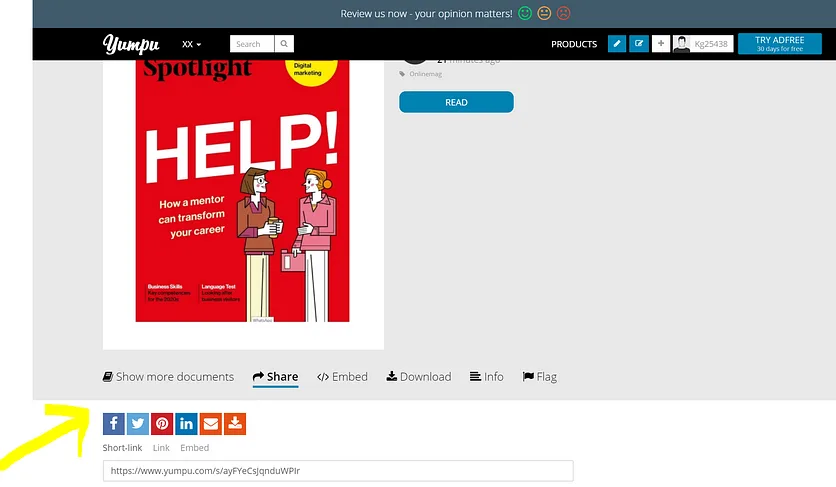
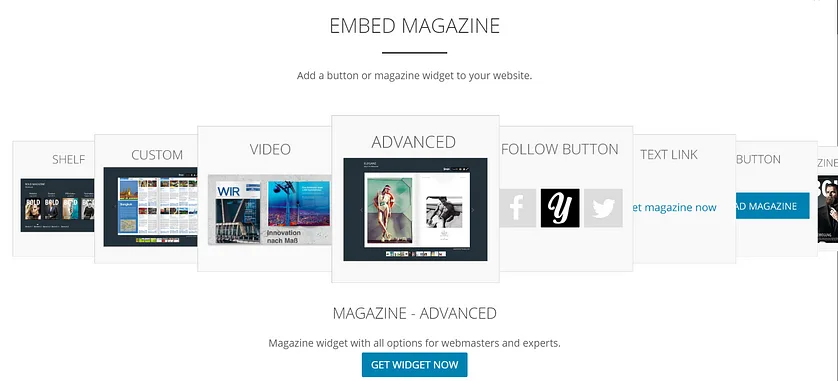
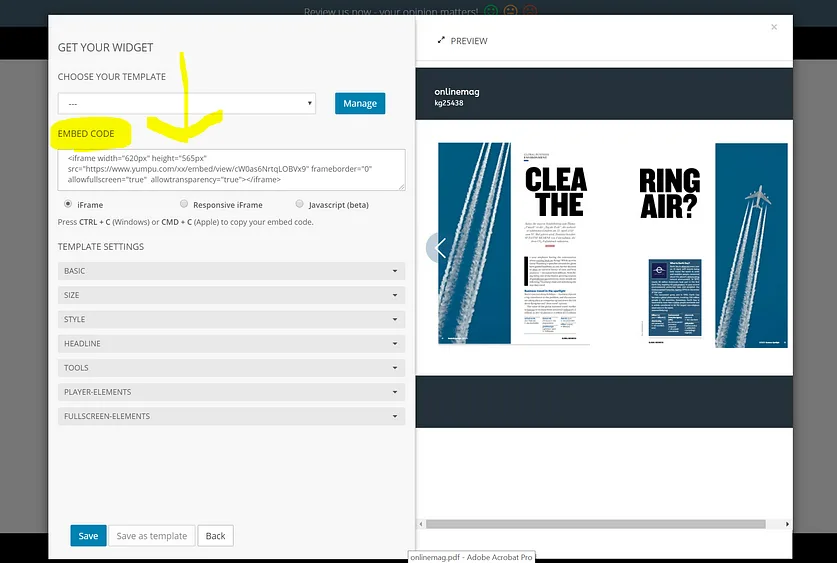
Once your flipbook is ready, sharing it takes one click. Use the social media buttons to post directly to Facebook, LinkedIn, or other networks. For embedding on your website or blog, go back to your magazine settings and scroll to the "Embed" section. Click "Open Embed Options," select the advanced embed option, and copy the generated code. Paste it into your site's HTML — your flipbook now lives on your web page. You can also include the flipbook link in your email footer, giving every message you send a direct route to your latest publication. This is one of those small moves that builds consistent readership without any additional effort.
Real-World Impact: How an HTML5 Flipbook Transformed an Organization
The practical benefits become very clear once you put the tool to work in a real context. Starting with a two-page brochure and gradually scaling up to a full 40-hour training manual, it's possible to see just how far the format can go. The training book — which previously existed only as a printed volume filled with graphs, policy documents, and exercises — was converted into a digital interactive flipbook that volunteers and staff could access on any device, at any time.
The multimedia hotspot feature made it possible to embed training videos and audio files directly into the relevant pages. Instead of relying on a single laptop during sessions, trainees could review media content independently on their phones or tablets and come to the next session prepared for deeper discussion. The page-turn sound and visual effect alone made the experience feel more like reading a real publication — a small detail that consistently drew positive feedback.
Cost Savings and Reduced Print Dependency
Before switching to digital flipbooks, every new employee required a freshly printed training book — adding up in paper, ink, and binding costs over time. Monthly publications were distributed physically to various locations and brought to board meetings in hard copy. Moving everything to an HTML5 digital publication eliminated those recurring costs almost entirely. The budget decreased noticeably, and the time spent on logistics shrank as well. For organizations operating on tight budgets — non-profits, community groups, small teams — this kind of saving is meaningful. And because updates can be made to a published flipbook without reprinting anything, the content always stays current. This is especially relevant for people curious about how HTML5 flipbooks are used in real estate, where listings and brochures change frequently.
Wider Reach and SEO-Driven Growth
The SEO optimization built into YUMPU Publishing had a visible effect within weeks. Publications started appearing in Google search results for relevant queries, bringing in contacts and inquiries from people who had found the organization's content while searching for related services. What started as an internal tool gradually became a channel for community outreach, invitations to speak at schools and colleges, and requests to participate in statewide events. Social sharing amplified this reach further — each publication shared on social media drew new audiences who wouldn't have found the content otherwise. This is a good illustration of why digital publishing platforms are worth taking seriously, and also why it's worth understanding why you should choose free HTML5 flipbook software over staying locked into PDF-only workflows.
Key Features Worth Knowing About
Mobile optimization: HTML5 flipbooks render correctly on all screen sizes — from smartphones to widescreen monitors — without any manual adjustment.
Google and AI indexing: Unlike a static PDF, the content of your flipbook is readable by search engines and AI crawlers, giving it real discoverability.
Multimedia embedding: Videos, audio, hyperlinks, and image galleries can be placed on any page through the Hotspot Editor.
Sign-up form integration: Add mailing list forms directly inside your publication to grow your subscriber base passively.
Google Analytics support: Track page views, clicks, and reader behavior to understand what's working and refine your content strategy.
Device compatibility: Publications are accessible on iPhones, Android devices, tablets, Macs, and Windows PCs — any browser, no app required.
Website embedding: The embed code makes it trivial to integrate your flipbook into any website or blog, improving on-page engagement.
Is YUMPU Publishing Right for You?
If you need to publish any kind of document — a magazine, a catalog, a training guide, a community newsletter, a board report — and you want it to look professional, load fast, and actually get found online, then YUMPU Publishing is a serious option. The free plan covers the core workflow from upload to sharing. For teams and publishers who want to remove ads, access detailed analytics, and unlock advanced customization, the adFREE plan adds meaningful value without being prohibitively expensive. Customer support has consistently been helpful for anything not covered in the interface itself, which lowers the barrier considerably for people who are new to digital publishing.
Anyone who needs a free, HTML5-ready flipbook solution should give this platform a serious look. The ease of converting a PDF into a fully interactive digital publication — complete with multimedia, SEO metadata, and embedding options — is genuinely surprising. Once you've published your first flipbook, going back to sending static PDFs feels like a step backwards.
FAQ: HTML5 Flipbook Creation with YUMPU Publishing
What is an HTML5 flipbook?
An HTML5 flipbook is a digital publication that mimics the look and feel of a printed book or magazine — with a realistic page-turn effect — but runs entirely in a web browser using HTML5 technology. It works on any device without plugins or app downloads.
Do I need coding skills to create an HTML5 flipbook?
No. Platforms like YUMPU Publishing handle all the technical conversion automatically. You simply upload a PDF, add metadata, and your flipbook is ready to share. No HTML or programming knowledge is needed at any step.
What file format do I need to start?
You need a PDF file. You can create one from Microsoft Word, PowerPoint, Google Docs, Adobe Photoshop, InDesign, or virtually any other design tool. If your publication is split across multiple PDF pages, merge them first using a free tool like IlovePDF.
Is YUMPU Publishing really free?
Yes — the basic plan is free and covers the full core workflow: upload, convert, publish, and share. A paid adFREE plan is available for users who want to remove advertising, access Google Analytics integration, and unlock additional customization options.
How long does it take to create a flipbook?
The basic flipbook — upload, convert, publish — takes 2–3 minutes. Adding multimedia elements, customizing the appearance, and writing a full SEO description might bring the total to around 20 minutes for a polished result.
Can I embed my flipbook on my own website?
Yes. YUMPU Publishing provides an embed code that you can paste directly into any website or blog. The flipbook appears as an interactive viewer, keeping visitors on your site while they read your content.
Will my flipbook be indexed by Google?
Yes. HTML5 flipbooks published on YUMPU are indexed by search engines, including Google. Adding a detailed description, a clear title, and at least five relevant tags significantly improves how quickly and how highly your flipbook appears in search results.
Can I add videos and audio to my flipbook?
Yes. The Hotspot Editor lets you embed YouTube videos, audio files, and hyperlinks directly onto specific pages of your flipbook using a simple drag-and-drop interface. No additional software or technical setup is required.
Can I share my flipbook on social media?
Yes. YUMPU Publishing includes direct sharing buttons for Facebook and other networks. You can also share the publication link manually on any platform. Each share gives your content additional reach beyond your existing audience.
What kinds of publications work best as HTML5 flipbooks?
Almost any document benefits from the format: magazines, product catalogs, training manuals, annual reports, community newsletters, event brochures, and educational materials. The interactive PDF format is particularly effective for multi-page documents that benefit from a structured, page-by-page reading experience.
 Robert Taylor
Visual artist, sometimes triathlete, holder of serious parking karma & drip coffee skills. Web developer, creative, music maker, cook. Yep, that's me!