
Why should you use a Flipbook Maker?
Updated on: 19.05.2026
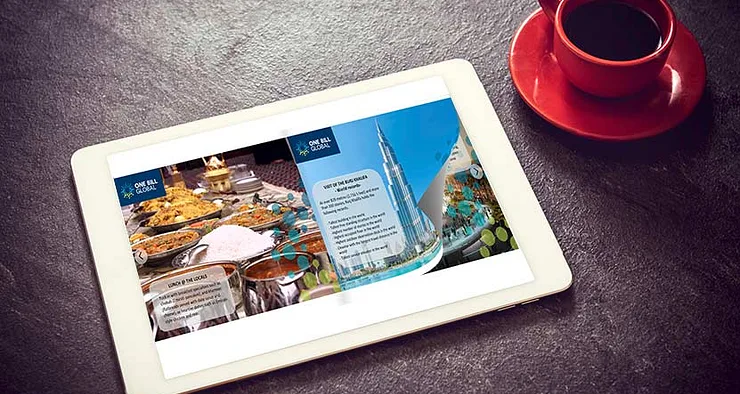
If you're looking for a smarter way to share PDFs online, a flipbook maker is the tool you need. Instead of static files that get ignored, flipbooks turn your content into interactive, magazine-style publications that work on any device — and YUMPU Publishing is one of the best options available, even on its free plan.
Why Flipbooks Are Replacing Static PDFs
Static PDFs are functional, but they're not built for the modern web. Readers on mobile devices struggle with them, they don't embed cleanly into websites, and they offer zero engagement analytics. An interactive flipbook solves all of these problems: it loads in the browser, responds to touch gestures, and can be shared directly on social media or embedded into any page with a single snippet of code. For businesses and bloggers alike, this shift from "PDF as print preparation" to "PDF as digital content" is a significant upgrade in how content reaches an audience.
YUMPU Publishing: A Flipbook Maker That Works on All Devices
One of the first things you'll notice about YUMPU Publishing is that the flipbooks it creates are fully responsive. Whether your reader is on a desktop, tablet, or smartphone, the layout adapts automatically. The conversion is based on HTML5, which means readers can zoom into small details without any loss of image quality, and they can search text within the publication just as they would on a standard webpage. For creators who want their content to reach the widest possible audience, cross-device compatibility is essential — and YUMPU delivers this from day one.
Getting Started: How Easy Is It to Use?
The workflow is straightforward. You upload your PDF, wait a few minutes for the conversion to complete, and then optionally edit the result: add your logo, adjust background colors, and insert multimedia elements like videos, audio files, or hyperlinks. The whole process takes less time than formatting a traditional document. Because YUMPU handles the technical conversion automatically, you don't need any coding knowledge or design experience to publish a professional-looking digital magazine.
If you want to explore the tool before committing to a paid plan, you can start directly with the free PDF to flipbook converter to see how your content looks once converted.
Create your free account on YUMPU Publishing and turn your first PDF into an interactive flipbook in minutes — no credit card required.
Choosing the Right Plan for Your Needs
YUMPU Publishing offers a free plan alongside several premium tiers. Here's a clear breakdown to help you decide which one fits your situation:
The FREE Plan
The free plan lets you convert PDFs into flipbooks without spending anything. It includes core functionality that already surpasses many paid alternatives elsewhere. If you're just getting started with digital magazine publishing or want to test the format before investing, this is a solid starting point.
The adFREE Plan
For around $19.95 per month, the adFREE plan removes all third-party ads from your publications. You can upload up to five magazines per day, customize brand colors, and produce SEO-optimized HTML content. Google Analytics integration is included, giving you performance data on your publications.
The WEBKiosk Plan
The WEBKiosk plan allows you to upload up to 100 magazines under your own brand, publish them to a custom subdomain, and even monetize your kiosk by featuring advertising. It's a strong choice for publishers who want a dedicated, branded reading hub online.
The APPKiosk Plan
With APPKiosk, you get unlimited magazine uploads hosted inside a customized app available for both Android and iOS. This plan is designed for organizations that want to reach mobile readers through a branded app experience, with unlimited support included.
The PROKiosk Plan
The PROKiosk plan combines all features from the lower tiers and adds advanced branding options directly within the publications. It's the top-tier choice for businesses that need full white-label control and maximum scalability. Upgrading from any lower plan is possible at any time.
Key Benefits That Make a Difference
Better Visual Quality and Design Flexibility
YUMPU's conversion engine preserves image quality regardless of the original file size or format. You can also customize the visual presentation with your brand colors and design elements, turning a generic PDF into something that actually reflects your identity. For businesses, this means every publication doubles as a branding touchpoint.
Lower Distribution Costs
Printing and mailing physical catalogs, brochures, or magazines is expensive. A digital flipbook eliminates print, postage, and distribution costs entirely. You can update content at any time without reprinting — ideal for price lists, product catalogs, or event programs that change regularly. Sharing a flipbook via a link in your email footer or on social media costs nothing and reaches a far wider audience than a print run ever could.
For more on maximizing what a Flipbook Creator can do for your content strategy, it's worth exploring how different publishing workflows compare.
Sophisticated Access and Security Controls
YUMPU lets you control exactly who can view, download, or share your flipbooks. You can set password protection, restrict access by location, and define print permissions — all through the publication privacy settings. This is particularly valuable for internal company documents, paid content, or exclusive publications for members.
Built-In SEO Benefits
Unlike a static PDF that search engines largely ignore, a flipbook published through YUMPU is converted into indexed HTML content. You can edit titles, descriptions, and keywords for each publication, helping it appear in relevant Google searches. This is a meaningful advantage for anyone using content marketing to grow organic visibility — your catalog, lookbook, or whitepaper can actually be found by people who are actively searching for that topic. PDF to Flipbook Free tools that skip this conversion step leave a lot of discoverability on the table.
Analytics and Marketing Insights
Knowing how readers interact with your content is essential for refining your strategy. YUMPU integrates with Google Analytics, giving you data on page views, reader locations, time spent on publications, and more. For businesses running content marketing campaigns, this kind of insight makes it possible to produce more of what's working and cut what isn't.
Step-by-Step: How to Create Your First Flipbook
Create a free account on YUMPU Publishing.
Upload your PDF document and wait for the automatic conversion to complete.
Edit the title and description to include relevant keywords for SEO.
Customize the design with your logo and brand colors if desired.
Use the embed code to add the flipbook to your website or blog.
Share the flipbook link on social media using the built-in share feature.
Add multimedia elements (video, audio, slideshows) via the Hotspot editor if needed.
Set access controls and password protection if you want to restrict viewing.
FAQ: Flipbook Maker – Your Questions Answered
What is a flipbook maker and what does it do?
A flipbook maker is a tool that converts static PDF files into interactive, page-turning digital publications. The result behaves like an online magazine, with animated page turns, multimedia support, and full responsiveness across devices.
Is YUMPU Publishing really free to use?
Yes, YUMPU offers a free plan that lets you convert and publish PDFs as digital flipbooks without any upfront cost. The free plan includes core features that are genuinely useful, though premium plans unlock additional capabilities like ad removal and custom branding.
Can I embed a flipbook on my own website?
Absolutely. YUMPU provides an embed code for each publication, which you can paste into any webpage or blog post. This lets you offer readers an interactive reading experience without ever leaving your site.
Are flipbooks indexed by Google?
Flipbooks created with YUMPU are converted into HTML5 format, which means search engines can crawl and index the content. This gives your publications a significant SEO advantage over standard PDF files, which are much harder for Google to index effectively.
Can I share flipbooks on social media?
Yes. Every YUMPU flipbook gets its own shareable URL, and the platform includes built-in social sharing options. This makes it easy to distribute your content across platforms like LinkedIn, Facebook, or Twitter with a single click.
What file formats does YUMPU accept?
YUMPU primarily works with PDF files. You simply upload your PDF and the platform handles the conversion to interactive HTML5 flipbook format automatically.
How do I protect a flipbook from unauthorized access?
YUMPU includes privacy settings that let you add password protection, restrict downloads, and control who can print or share your publications. These settings are managed directly within your account dashboard.
Can I track how readers interact with my flipbooks?
Yes, YUMPU supports Google Analytics integration, so you can track views, reader locations, time on page, and other engagement metrics for each of your publications.
Is a flipbook suitable for business use?
Flipbooks are well-suited for a wide range of business use cases including product catalogs, company brochures, annual reports, employee handbooks, and event programs. The ability to update content digitally without reprinting makes them especially cost-effective for materials that change frequently.
How does a flipbook compare to simply sharing a PDF link?
A flipbook is significantly more engaging and functional than a raw PDF link. It loads directly in the browser, works on mobile without requiring a PDF viewer app, supports multimedia, can be embedded in websites, and is indexable by search engines — advantages a plain PDF link cannot match.
 Robert Taylor
Visual artist, sometimes triathlete, holder of serious parking karma & drip coffee skills. Web developer, creative, music maker, cook. Yep, that's me!