
Flipbook Animation Software which is 100% Free with a Tutorial
Updated on: 21.07.2026
If you've ever wanted to turn a plain PDF into an interactive, page-turning flipbook without spending a fortune, this guide is for you. We'll walk you through exactly how flipbook animation software works, how to use it for free, and why it's a game-changer for small businesses like restaurants — based on real firsthand experience.
Why a Digital Flipbook Makes All the Difference
My dad owns a restaurant in our hometown. When it came time to get the menu online, we didn't want to just attach a PDF to an email or slap a download link on a website. We wanted something that felt like actually holding the real menu — pages that turn, a layout that breathes, something that looks professional without costing thousands of dollars.
That's when we started looking into flipbook animation software. The idea was simple: take our existing PDF menu and convert it into a sleek, interactive digital menu online. What we discovered changed how we think about digital publishing altogether.
What Is Flipbook Animation Software?
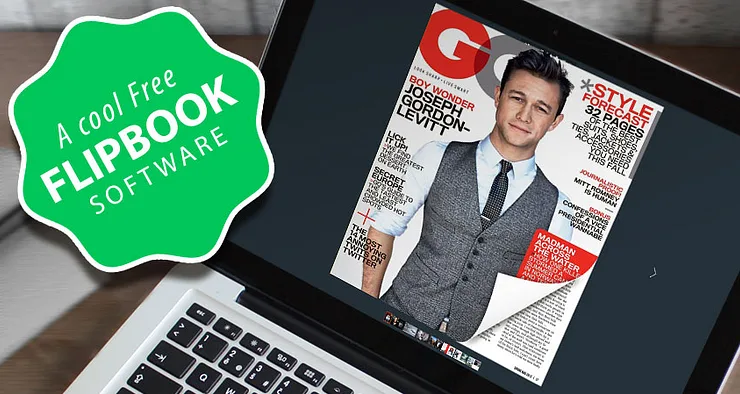
Flipbook animation software converts a static PDF file into a digital publication with realistic page-turn effects. Instead of scrolling through a flat document, your readers can flip through pages just like a real book or magazine — on any device, whether desktop, tablet, or smartphone.
The process is straightforward: you upload your PDF to a flipbook converter, and within a few minutes, your document is transformed into an interactive experience. No coding, no design skills required. For small business owners who want a professional result without a big budget, this approach to PDF to flipbook free conversion is genuinely appealing.
How I Found the Right Tool (and What I Tried First)
Before landing on the right solution, I tested a handful of tools. Most of the animation apps I found first — things focused on stop-motion or drawing animation — weren't what we needed at all. Then I tried platforms like Issuu and Joomag. Both had interesting features, but their pricing quickly became a barrier for a family restaurant just trying to get a menu online.
What I needed was something that balanced ease of use, visual quality, and cost. After more research, I came across YUMPU Publishing — and it checked every box.

The interface felt clean and approachable right from the start. You could style and color-coordinate your publication, the page-turn animation looked natural, and — crucially — the basic plan was completely free to sign up for. I registered and haven't looked back since. For anyone who wants to explore free PDF flipbook publishing software, YUMPU is a solid starting point.
If you're curious about the broader process, there's also a helpful guide on how to make a flipbook from PDF that goes deeper into the technical side of things.
Step-by-Step: How to Create Your First Free Flipbook
Here's exactly how we went from a Word document to a live digital menu, step by step:
Prepare your PDF. If you already have one, you're set. If you're starting from a Word document or Excel sheet, use the "Save as PDF" function or a free converter like freepdfconvert.com.
Create a free YUMPU account. Head to the YUMPU website and sign up — no credit card needed for the free plan.
Upload your PDF. Drag your file into the upload box or browse from your computer.
Wait for conversion. The flipbook animation software processes your file, usually within a few minutes.
Find your publication. Once done, it appears under "My Publications" in your dashboard.
Edit and publish. Add titles, descriptions, and any extra information. Then share it, embed it, or link to it.
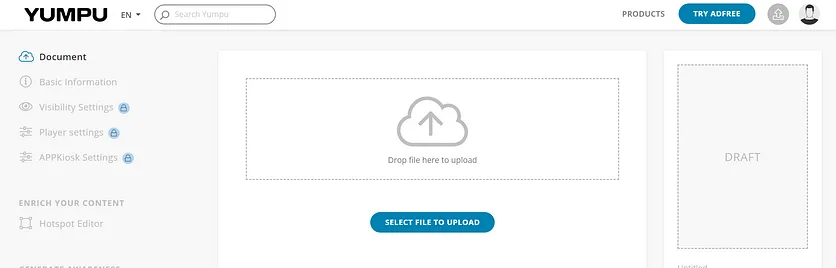
That's genuinely all there is to it. The whole process took us less than 20 minutes from raw PDF to live interactive flipbook.
A Real Example: Our Restaurant Menu as an Interactive Flipbook
The difference between the old PDF and the finished flipbook was remarkable. What had been a flat file sitting in a folder on my computer became something worth sharing. Potential customers browsing the restaurant's website could now flip through the menu as if holding it in their hands — on a phone, a tablet, or a laptop.
For any restaurant owner thinking about a online menu creator, this kind of digital presentation genuinely elevates the guest experience before they've even walked through the door.

Beyond the menu itself, the reach was another surprise. Publications on YUMPU can be shared directly to social media platforms, which meant our menu could reach people well beyond our usual circle. That kind of organic visibility would have cost a significant marketing budget through traditional channels.
Ready to try it yourself? You can start for free today and have your first flipbook live within the hour.
Key Features Worth Knowing About
Beyond the page-turn effect, there are several features that make flipbook software genuinely useful for business and content publishing:
Google indexing: Your flipbook's content gets indexed by Google, which means it can appear in search results. For a restaurant menu or product catalog, this kind of organic visibility is hard to replicate otherwise.
Embed on your website: You can embed the flipbook directly into any webpage, keeping visitors on your site longer and improving the overall user experience.
Social media sharing: One-click sharing to platforms like Facebook and Twitter extends your reach without any additional effort.
Multimedia integration: Paid plans allow you to add videos, audio, and clickable links directly inside your flipbook — for example, linking your restaurant's logo back to your booking page.
Multi-device support: Flipbooks display correctly on smartphones, tablets, and desktop computers without any extra configuration.
E-mail footer use: A link to your flipbook in an email footer is a subtle but effective way to keep your catalog or menu in front of existing customers.
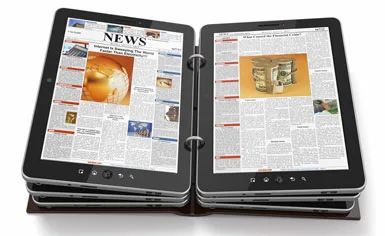
For anyone in the gastronomy business, these features combine to make a strong case for going digital. Printing and distributing physical menus has real costs — paper, printing, delivery, and the headache of reprinting every time something changes. An interactive digital flipbook can be updated instantly, meaning your menu is always current without any of that overhead.
Who Should Use Flipbook Animation Software?
The short answer: anyone who regularly works with PDFs they want other people to actually read and engage with. That includes:
Restaurant owners sharing menus online
Small businesses publishing product catalogs or brochures
Bloggers and content creators repurposing long-form content
Marketers distributing digital magazines or lookbooks
Event organizers sharing programs or schedules
The interactive flipbook format makes content feel more intentional and polished than a raw PDF — and for an audience used to slick digital experiences, that impression matters.
Final Thoughts on Free Flipbook Animation Software
The digital world rewards businesses that present themselves well online. For my dad's restaurant, switching from a static PDF to a live interactive flipbook was one of the easiest upgrades we made — and one of the most visible to customers. It didn't require a developer, a designer, or a big marketing budget.
If you're sitting on a PDF right now — a menu, a brochure, a catalog — there's no real reason not to try converting it. The free tier is genuinely functional, the learning curve is nearly flat, and the result looks far more professional than anything a plain PDF download page can offer.
FAQ: Flipbook Animation Software
What is flipbook animation software used for?
Flipbook animation software converts static PDF files into interactive digital publications with realistic page-turn effects. It's commonly used for online menus, product catalogs, magazines, brochures, and any document you want to share in a more engaging format.
Is there a truly free flipbook animation software?
Yes. YUMPU Publishing offers a free plan that lets you upload PDFs and publish them as interactive flipbooks without any upfront cost. Some advanced features like multimedia embedding and ad removal are available on paid plans.
How long does it take to convert a PDF to a flipbook?
Most PDF files are converted within a few minutes after upload. Larger or more complex documents may take slightly longer, but the process is typically complete well under ten minutes.
Can I embed a flipbook on my own website?
Yes. Once your flipbook is published, you can copy an embed code and paste it directly into any webpage. This keeps visitors on your site while they browse the publication.
Will my flipbook be found on Google?
Publications hosted on YUMPU can be indexed by Google, which means the content inside your flipbook — including text and images — can appear in search results. This is a significant advantage over a simple PDF download link.
Can I share my flipbook on social media?
Yes. YUMPU flipbooks can be shared directly to platforms like Facebook and Twitter with a single click. This makes it easy to distribute menus, catalogs, or magazines to a wider audience at no extra cost.
Do I need design or coding skills to create a flipbook?
No. The process requires nothing more than a PDF file and a browser. You upload the PDF, wait for conversion, and your flipbook is ready. No design tools or technical knowledge are needed.
Can I update my flipbook after publishing it?
Yes. You can edit your publication details and settings at any time through the "My Publications" dashboard. This means your menu or catalog can always reflect current pricing or offerings without reprinting anything.
Is flipbook software suitable for restaurant menus specifically?
Absolutely. A digital menu presented as a flipbook gives potential guests the feeling of browsing a real menu before visiting. It can be embedded on your restaurant's website, shared on social media, and updated whenever your offerings change — far more flexible than a printed version.
What file formats can I upload to create a flipbook?
Most flipbook tools, including YUMPU, work primarily with PDF files. If your document is in Word or Excel format, you can convert it to PDF first using built-in "Save as PDF" functions or a free online converter before uploading.
 Robert Taylor
Visual artist, sometimes triathlete, holder of serious parking karma & drip coffee skills. Web developer, creative, music maker, cook. Yep, that's me!