
Flipbook Creator with which you can create a free HTML5 Flipping Book
Updated on: 15.05.2026
If you've ever wondered how to turn a static PDF into an engaging, page-turning experience that readers can browse on any device, a free flipbook creator is exactly what you need. In this guide, we'll walk you through what HTML5 flipbooks are, why they outperform plain PDFs, and how to get started with one of the best free tools available today.
What Is an HTML5 Flipbook?
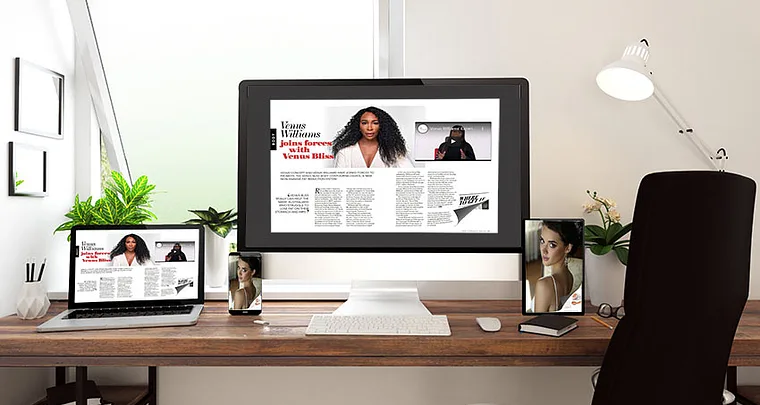
An HTML5 flipbook is an interactive digital publication that replicates the look and feel of a real physical book — complete with a smooth page-turning animation and even a realistic page-flip sound. Unlike a standard PDF, it runs natively in any modern browser without requiring extra plugins or downloads. Flipbooks are rapidly gaining popularity among bloggers, small business owners, and content creators because they make digital content feel alive rather than flat.
If you want to go deeper into the technical side, learning about Flipping Book HTML5 software is a great starting point to understand how the underlying technology works and what it enables.
Why Choose a Flipbook Over a Plain PDF?
PDFs have served us well for decades, but they come with real limitations when it comes to modern digital publishing. Here's why more creators are making the switch to interactive flipbooks:
Visual impact: Flipbooks look significantly better on smartphones and tablets. The page-turning effect creates an immersive reading experience that a static PDF simply can't match — and if you opt for a 3D flipbook, the wow factor goes even further.
Effortless sharing: Instead of attaching a bulky file, you share a single link. Recipients can open it instantly in any browser on any device — no download, no upload, no hassle.
Easy embedding: Embedding a flipbook into a website, a blog post, or even an email footer is straightforward. This improves the user experience on your site and keeps visitors engaged longer.
Faster loading: Large PDFs can run to 100 MB or more, which means slow load times on weaker connections. Flipbooks load page by page, so readers aren't left waiting.
Better Google visibility: Because flipbooks are native HTML5 documents, search engines can index their content directly. This gives your published material a real SEO advantage over PDF files, which are far harder for Google to crawl effectively.
How to Create a Flipbook Online: Step-by-Step
Creating an interactive digital flipbook doesn't need to be complicated or expensive. With a free flipbook creator online, the process is reduced to just a few straightforward steps:
Create a free account: Head to YUMPU Publishing and sign up using your email address. You'll receive an activation link to confirm your account — the whole process takes under two minutes.
Upload your PDF: Once you're logged in, upload the PDF you want to convert. The platform handles all file formats and sizes without requiring any technical setup on your end.
Let the tool do the work: Within minutes, your PDF is transformed into a fully interactive flipbook with the page-turning effect applied automatically.
Customize and publish: Add your own brand logo, embed videos or hyperlinks within the flipbook pages, and then publish or share your content directly from the platform.
Once published, your flipbook is ready to be shared across all major social media platforms — Facebook, LinkedIn, Twitter, and more — giving your content far greater reach than a PDF attachment ever could.
Ready to try it yourself? Create your free account on YUMPU Publishing and convert your first PDF in minutes.
What Makes YUMPU Publishing Stand Out?
There are plenty of digital publishing tools out there, but most quality options come with steep price tags, and the free alternatives often feel limited. YUMPU Publishing hits a different balance. Here's what sets it apart as a platform for creating interactive flipbooks:
Completely free to start: The core flipbook creation feature costs nothing. You can upload your PDF and publish a fully functional interactive flipbook without spending a penny.
Works on every device: Whether your readers are on a desktop, tablet, or smartphone, flipbooks created on this platform display correctly and perform smoothly.
SEO-ready out of the box: Flipbooks are indexed by Google and other search engines, meaning your publications can actually be found organically — a major advantage for bloggers and businesses focused on digital publishing.
Social media integration: Built-in sharing tools make it simple to distribute your flipbooks on LinkedIn, Facebook, Twitter, and other platforms, expanding your audience without extra effort.
Embeddable anywhere: The platform provides embed codes so you can drop your flipbook directly into your website or blog. This is especially useful for keeping visitors on your site longer and improving the overall user experience.
Support for rich media: Unlike standard PDFs, your flipbook can include embedded videos and clickable hyperlinks — turning passive documents into genuinely interactive experiences.
YUMPU Publishing Plans: Which One Is Right for You?
YUMPU Publishing offers a range of plans to match different publishing needs. The free tier is a solid starting point, and the premium plans unlock additional features for more serious publishers:
ADFREE Plan: Ideal for publishers who want a clean, professional-looking catalog without third-party ads. This plan also makes website and blog integration more seamless.
WEBKiosk Plan: Perfect for anyone managing multiple publications. This plan lets you organize all your online magazines and flipbooks in one tidy, branded online kiosk.
APPKiosk Plan: If you want your content accessible via a dedicated iOS or Android app, this is the plan to go for — great for reaching a mobile-first audience.
PROKiosk Plan: The most comprehensive option, combining the features of WEBKiosk and APPKiosk. It also includes advanced subscription management tools, making it the go-to choice for professional publishers.
Practical Use Cases: Where Flipbooks Really Shine
Understanding the tool is one thing — knowing where to apply it is another. Here are some situations where converting a PDF to a flipbook genuinely makes a difference:
Company brochures and catalogs: Instead of emailing a heavy PDF attachment, share a link to your interactive catalog. Customers can browse it instantly on any device.
Email footers: Adding a flipbook link to your email signature or newsletter footer is an understated but effective way to drive traffic to your latest publication.
Educational materials: Teachers and trainers can publish course materials, guides, or handouts as flipbooks — easy to update and always accessible online.
Marketing content: White papers, case studies, and lookbooks come alive as interactive flipbooks, and their SEO indexability means they can attract organic search traffic over time.
Replacing print runs: For businesses that previously printed and distributed physical catalogs, digital flipbooks dramatically cut printing and postage costs — and they can be updated instantly whenever something changes.
FAQ: Flipbook Creator — Everything You Need to Know
What is a flipbook creator?
A flipbook creator is an online tool that converts PDF documents into interactive digital publications with a realistic page-turning effect. These publications, known as flipbooks, can be shared via link, embedded on websites, or published on social media.
Is YUMPU Publishing really free to use?
Yes, YUMPU Publishing offers a free plan that lets you upload PDFs and create fully functional interactive flipbooks at no cost. Premium plans are available for additional features such as ad removal, custom branding, and app distribution.
Do I need design or coding skills to create a flipbook?
No skills are required. You simply create an account, upload your PDF, and the platform automatically converts it into a flipbook. The whole process takes just a few minutes.
Can I embed a flipbook on my website?
Yes, YUMPU Publishing provides embed codes that allow you to place your flipbook directly on any website or blog. This is a great way to enrich your web content and keep visitors engaged longer.
Are flipbooks indexed by Google?
Yes, because flipbooks are built on HTML5, search engines like Google can index their content directly. This gives flipbooks a significant SEO advantage over standard PDF files.
What file formats can I use to create a flipbook?
YUMPU Publishing works with PDF files. Simply prepare your document as a PDF and upload it to the platform for conversion.
Can I share my flipbook on social media?
Absolutely. YUMPU Publishing integrates directly with major social media platforms including Facebook, LinkedIn, and Twitter, making it easy to share your flipbook and reach a wider audience.
Can I add videos or links inside a flipbook?
Yes, YUMPU Publishing supports embedded videos and clickable hyperlinks within flipbook pages, turning your static document into an interactive digital experience.
What's the difference between the WEBKiosk and APPKiosk plans?
The WEBKiosk plan lets you create a branded online kiosk for all your publications, accessible via browser. The APPKiosk plan takes this further by making your content available through a dedicated iOS or Android app for mobile audiences.
Is a flipbook better than a PDF for business use?
In most digital contexts, yes. Flipbooks load faster, look more professional on mobile devices, are easier to share, and can be indexed by search engines — all of which make them a stronger choice for businesses wanting to maximize the reach and impact of their publications.
 Robert Taylor
Visual artist, sometimes triathlete, holder of serious parking karma & drip coffee skills. Web developer, creative, music maker, cook. Yep, that's me!