
Benefits of Flipbooks for Students – Questions and Answers

Updated on: 21.07.2026
Digital flipbooks give students a practical edge: they transform static PDFs into interactive, browser-readable documents that are easy to share, visually compelling, and far more versatile than a printed handout. Whether you're submitting a seminar paper, building a portfolio, or studying for exams, flipbooks fit naturally into modern academic life.
What Is a Digital Flipbook — and Why Should Students Care?
A digital flipbook is a browser-based document that mimics the tactile experience of a real book, complete with page-turn animations and a clean, distraction-free reading interface. Unlike a static PDF, it can include embedded videos, audio clips, and clickable hyperlinks — turning a passive document into genuine interactive learning material. For students managing coursework across multiple formats, that flexibility makes a meaningful difference. No special app is needed on the reader's side, and the document works on any device — desktop, tablet, or smartphone.
Creating a Flipbook: Simpler Than You Expect
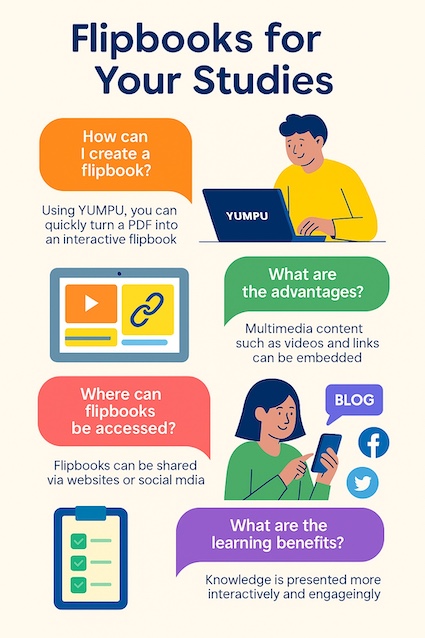
A common assumption is that building a flipbook requires design skills or technical know-how. In practice, modern platforms handle everything automatically: you upload your PDF via drag & drop, and the conversion happens within minutes. No coding, no design software, no steep learning curve. For students already stretched across lectures, assignments, and deadlines, that low barrier matters.
Upload any PDF via drag & drop — no technical skills required
Automatic conversion to an interactive flipbook in minutes
Works for seminar papers, theses, project reports, and study summaries
Free to get started — no subscription needed for the basic version
If you want a broader picture of what's available before committing to one tool, the free flipbook software overview is a good starting point for comparing options on features and pricing.
Interactive Content: Beyond the Page Turn
Where flipbooks genuinely outperform traditional PDFs is in their support for multimedia content. As a digital study tool, a flipbook lets you embed:
Explainer videos directly within the document
Audio recordings — useful for language learners or lecture summaries
Hyperlinks to research sources, datasets, or further reading
This transforms a document from something people read passively into something they actively engage with. For group projects or academic presentations, embedding supporting media gives your audience more context — and makes the work more memorable. It's also a far more dynamic format than anything a printed handout can offer.
Visibility and Reach: Getting Your Academic Work Seen
Publishing your work as a flipbook rather than a private PDF changes its discoverability entirely. Flipbooks hosted on platforms with SEO optimization can be indexed by Google — meaning your thesis, project report, or portfolio can turn up in a simple search. You can also embed your flipbook directly on a personal website or academic blog, or share it across social media with a single link. For students building a professional profile — whether for internship applications, early career networking, or academic recognition — this kind of digital reach is genuinely valuable. A well-presented flipbook portfolio is far more impressive than a folder of attached PDFs.
For a broader look at how this format is being applied in learning environments, Flipbooks – The Advantages for Educational Instruction covers the educational case in detail.
YUMPU takes this a step further with its ad-free publishing option — YUMPU adFREE – ad-free flipbook publishing for students ensures that your academic work is presented cleanly, without third-party ads distracting from the content.
If you want to put this into practice right away, you can create your free flipbook account and start publishing your first document in minutes.
Flipbooks as Digital Study Tools for Exam Season
Beyond academic projects, flipbooks are genuinely practical during exam preparation. Here's how students are using them to study more effectively:
Structured summaries: Convert handwritten or typed notes into a clean, navigable flipbook — searchable and well-organised
Embedded media: Add video explanations or audio walkthroughs to reinforce complex topics
Quick navigation: Jump directly to specific sections instead of scrolling through a long PDF
Mobile-ready: Access study materials on your smartphone or tablet, anywhere — responsive design means no formatting breaks
Sharing materials with a study group is equally straightforward: send a link, and everyone works from the same document — no version confusion, no file size limits in email attachments. Updating content is just as easy: revise the source PDF, re-upload, and the flipbook reflects the latest version immediately. No reprinting, no redistributing, no outdated handouts circulating after the fact.
Building a Student Portfolio with Flipbooks
One underused application of flipbooks in student life is portfolio building. Whether you're in design, journalism, architecture, or any field where showing your work matters, a flipbook-based portfolio is easy to share, visually engaging, and works as a standalone link you can include in application emails or LinkedIn profiles. Unlike a PDF attachment, it doesn't require the recipient to download anything — they browse your work directly in their browser, on any device. For students entering competitive job markets, that frictionless first impression can make a real difference. Building a digital portfolio for students with a flipbook is one of the most efficient ways to present a body of work professionally without needing a dedicated website.
Flipbooks vs. Printed Documents: A Practical Comparison
Printed handouts and bound reports still have their place — but for most academic purposes, a digital flipbook offers clear practical advantages. There are no printing costs, no distribution logistics, and no delays if something needs correcting. The reading experience works on any device, and the document is always one link away. For students conscious of both time and budget, shifting to PDF to interactive document formats like flipbooks reduces friction without sacrificing presentation quality. It also removes the environmental cost of unnecessary printing — a small but meaningful consideration for students who prefer to work sustainably.
FAQ: Flipbooks for Students – Common Questions Answered
What exactly is a digital flipbook?
A digital flipbook is a browser-based document that replicates the look and feel of a physical book with page-turn effects. Unlike a standard PDF, it supports embedded videos, audio, and clickable links, and can be read on any device without additional software.
Do I need design or coding skills to create a flipbook?
No. Most flipbook platforms, including YUMPU, convert an existing PDF automatically. You upload your document, and the platform handles the conversion — no technical background required.
Is YUMPU free for students?
Yes, YUMPU offers a free basic plan that allows you to create and publish flipbooks without a subscription. This is sufficient for most student use cases, including seminar papers, portfolios, and study guides.
Can I read my flipbook offline?
Depending on the platform and plan, flipbooks can be downloaded for offline reading. This is useful for studying in locations without reliable internet access.
How do I share a flipbook with classmates or a study group?
You can share a flipbook via a direct link, a QR code, or by embedding it into a website or blog. All recipients need is the link — no app or software download required on their end.
Can I embed multimedia content like videos into my flipbook?
Yes. Flipbook platforms support embedding videos, audio clips, and hyperlinks directly within the document. This is especially useful for enriching academic presentations or project reports.
Are flipbooks indexed by Google?
Flipbooks hosted on platforms with SEO support can be indexed by Google, making them discoverable through search. This is a significant advantage over private PDFs, which are generally not searchable online.
Can multiple students collaborate on a single flipbook?
Some subscription plans allow multiple users to work on shared projects, making group assignments and joint study materials more manageable. Check the platform's plan details for collaboration features.
Is a flipbook suitable for a student portfolio?
Absolutely. A flipbook-based portfolio is easy to share via a link, works on any device, and looks far more professional than a PDF attachment. It's well-suited for applications in design, journalism, architecture, and similar fields.
What's the difference between a flipbook and a regular PDF?
A standard PDF is a static document requiring a dedicated viewer. A flipbook is a browser-based, interactive format that supports multimedia, page-turn navigation, and direct sharing — all without requiring any software on the reader's side.
How do flipbooks help reduce study costs?
By replacing printed handouts and bound reports with shareable digital documents, flipbooks eliminate printing, binding, and distribution costs entirely. Updates are instant and free — no need to reprint corrected versions.
 Robert Taylor
Visual artist, sometimes triathlete, holder of serious parking karma & drip coffee skills. Web developer, creative, music maker, cook. Yep, that's me!